Working with Claude
kTeX has a built-in MCP server, the standard way AI apps connect to other programs. Once connected, Claude can read your document, write and restructure it, insert equations, chemistry and drawings, compile it, and look at the typeset pages to check its own work. It all happens in the open kTeX window, so you watch the changes appear.
Connecting
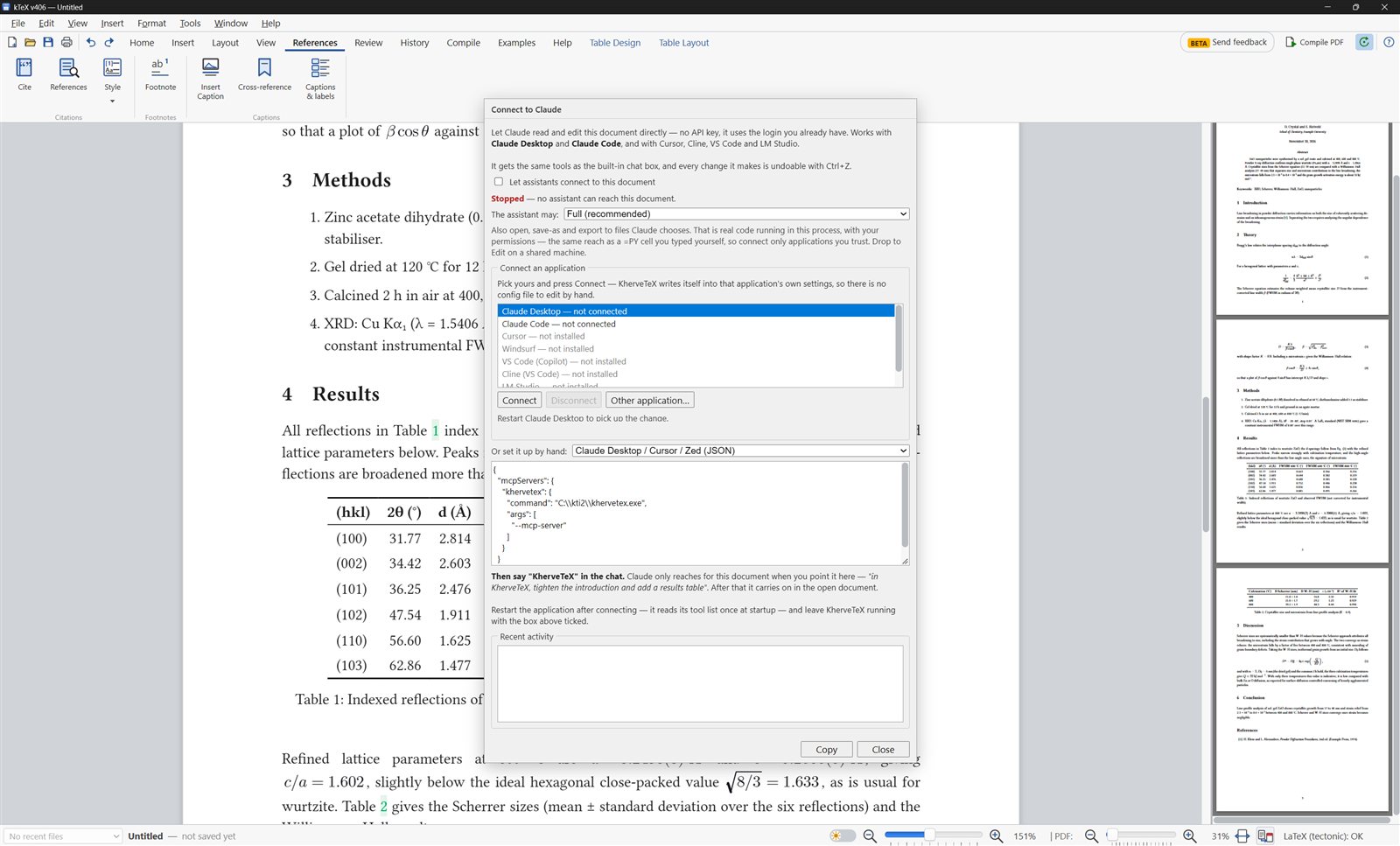
-
In kTeX, open Tools ▸ Connect to Claude…. The dialog shows whether kTeX is Listening.
-
Under Connect an application, choose your AI app. kTeX detects and sets up:
- Claude Desktop, Claude Code, Cursor, Windsurf
- VS Code (Copilot), Cline, LM Studio, Zed
kTeX backs up the app's configuration before changing it.
For any other app, choose Other application… and copy the snippet shown: JSON for Claude Desktop, Cursor and Zed, or a command line for Claude Code.
-
Restart that application.
-
In a chat, mention KherveTeX, for example: "In KherveTeX, add a results section with a table of these numbers and compile it."
What Claude may do
Choose the access level in the same dialog:
| Level | Claude can |
|---|---|
| Read only | read the document, its LaTeX and the PDF |
| Edit | also write and restructure the document, compile it and save it in place |
| Full (default) | also open documents, and save as or export to files it chooses |
The dialog's Recent activity list, and the status bar ("Claude: tool — outcome"), show everything Claude does.
Things to ask
- "Read my introduction and tighten the wording, keeping the citations."
- "Convert this paragraph's formulas into numbered equations with labels, and reference them in the text."
- "Insert the reaction for the oxidation of iron with states, and draw benzene next to it."
- "Compile, look at page 3, and fix whatever overflows the margin."
- "Check every \ref and \cite resolves, and list the problems."
- "Export the PDF to my Desktop."
Every change Claude makes can be undone with Ctrl+Z, like your own edits. Save a snapshot first (History ▸ Save snapshot and upload), and you can always go back to the version from before.